What Open Panel is
Open Panel is TwinFusion's multi-tenant platform for building and running many client websites, online stores and systems from one admin panel, instead of maintaining each site separately. It grew out of a custom e-commerce build for a flooring retailer and now sits at the centre of the Open Panel suite.
From one console, the team creates sites with a four-step wizard, manages pages, blogs, media, products and orders, applies templates and modules, runs SEO audits with PDF reports, and keeps watch over logs, uptime and backups. Each site's data is kept separate, and role-based access covers everyone from super admins to content editors.
How Open Panel works
Overview
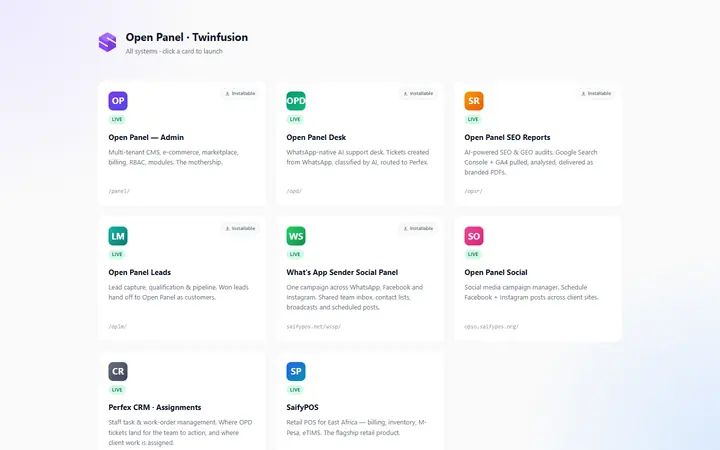
Open Panel is TwinFusion's multi-tenant content management and e-commerce platform: one admin panel from which the team creates and runs many client websites, stores and systems. It grew out of a custom e-commerce build for a flooring retailer and now sits at the centre of the Open Panel suite, alongside the support desk, SEO reports, leads and WhatsApp systems.
Who uses it
- Panel team (Super Admin, Admin, Developer) — run the platform across every site: sites, users, templates, modules and settings.
- Site teams (Site Admin, Editor, Content Manager, Sales Manager, Viewer) — work inside a single site, with access matched to their role.
Main modules
- Sites — create client sites with a four-step wizard (name, platform, plan, review) and assign a template.
- Content — pages, blog posts, media, hero banners, portfolio items and categories for each site.
- E-commerce — products with attributes and variations, and orders with a WhatsApp checkout handoff.
- Templates, modules and marketplace — install modules and plugins per site, import templates and publish them to the marketplace.
- SEO — crawl and score a set of pages, store the report, export it as a PDF and share it on WhatsApp.
- Webhooks — send updates to connected systems when things change.
- Logs and monitoring — activity, security, error and request logs, an audit trail, uptime monitoring and analytics.
- Backups and settings — site backups and platform settings.
- Users — role-based access at panel and site level.
How it works
- Create a site — an operator signs in, runs the four-step wizard and assigns a template; the new site gets its own separate data.
- Run the site — editors maintain pages, blog posts, media and banners; for a store, products are added, simple or with variations, and orders are worked through their statuses, with a WhatsApp handoff at checkout.
- Check SEO — the team crawls a set of pages, scores them, saves the report, exports a PDF and shares it on WhatsApp.
- Extend — modules and plugins are switched on per site, and templates are imported or published to the marketplace.
- Operate — logs, uptime, analytics and backups are reviewed centrally for every site.
Integrations
- WhatsApp — order handoff at checkout and sharing of SEO reports.
- Webhooks — updates to other systems.
- Open Panel Leads — won leads hand off to Open Panel as customers.
Platforms and access
- Web-based admin panel that can also be installed as an app, with an offline fallback page and a switcher for moving between the suite's systems.
- Role-based access at panel and site level, with each client site's data kept separate.