What Cultural Heritage Centre app is
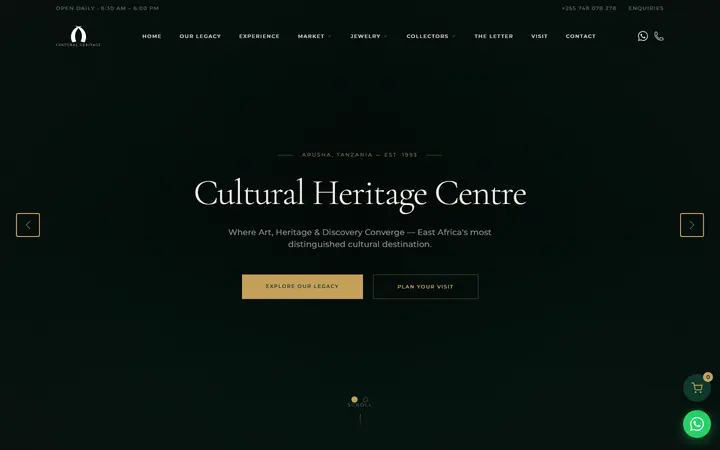
The Cultural Heritage Centre's Android app gives visitors and shoppers one place for the Arusha centre's four divisions: the main hub, The Market for handcrafts and spices, The Vault for tanzanite and fine jewellery, and Collectors for fine art and exhibitions.
Visitors can browse and search every shop, scan the QR code on an artwork to reserve it, build one cart across the shops and send the order through WhatsApp. They can also book exhibition visits or jewellery consultations and message the centre in the app. Content comes from the centre's WordPress sites, and the app keeps working offline, sending queued orders when the connection returns.
On the phone, too
An Android app for browsing the centre's four divisions, scanning artwork QR codes to reserve pieces and sending one combined order over WhatsApp. It caches content for offline use, queues orders until the phone reconnects and receives updates over the air.
How Cultural Heritage Centre app works
Overview
The Cultural Heritage Centre app puts the Arusha centre's four divisions into one Android app: the main hub, The Market for handcrafts, spices and artefacts, The Vault for tanzanite and fine jewellery, and Collectors for fine art and rotating exhibitions, each with its own colour scheme. Visitors can browse every shop, reserve artworks by scanning a QR code, send one combined order over WhatsApp, book visits and message the centre. All content is edited by centre staff in WordPress, and the app keeps working offline.
Who uses it
- Visitors and shoppers — browse and search the four divisions, scan artworks, build a cart and book visits, with no account needed.
- Account holders — sign in to reserve pieces, get a personal QR code and chat with the centre.
- Centre staff — scan a visitor's personal QR code to see their active reservations, and reply to chat messages.
- Content editors — manage products, exhibitions, pages and home-screen slides in WordPress.
Main modules
- Home — hero slides, division banners, heritage stories, videos, traveller reviews and quick contact.
- The Market — handcrafts, spices and artefacts by category.
- The Vault — tanzanite and fine jewellery, with a private consultation request.
- Collectors — exhibitions now showing, upcoming and past, with featured artworks.
- Scanner — reads the QR code on an artwork to open it, reserve it or add it to the cart.
- Cart and checkout — one cart across all the shops, sent as a WhatsApp order.
- Favourites, search and compare — saved items, search across all four divisions and side-by-side comparison.
- Chat and enquiries — in-app messages and booking forms.
How it works
- Open the app and browse or search across the hub, The Market, The Vault and Collectors.
- In the gallery, scan the QR code on an artwork to open its details, then reserve it or add it to the cart.
- Build one cart across the shops, enter a name, email and phone number, and send the order. It opens as a pre-filled WhatsApp message and is also recorded for the centre's staff.
- If the phone is offline, the order is saved and sent automatically when the connection returns.
- Book an exhibition visit or a private jewellery consultation through the in-app forms.
- At the centre, staff scan the visitor's personal QR code to bring up their active reservations.
Integrations
- WordPress network — products, exhibitions, pages and slides come from the same content as the centre's websites.
- WhatsApp — orders, and enquiries when email fails, are handed over to WhatsApp.
- Over-the-air updates — changes to screens and features reach phones without a new app download.
Platforms and access
- Android app; iOS is configured but not yet released.
- Works offline: content is cached on the phone, and favourites and the cart survive the app being closed.
- Guests browse without an account; an optional sign-in unlocks reservations, the personal QR code and chat.